A genderbend cosplay (or crossplay) is easier to plan when you can see yourself as the opposite gender before buying a wig or practising contour. An AI gender swap of your own photo gives you that preview in seconds. Use it as a planning reference: it shows which brow shape, jaw contour, hairline and hair length suit your face, so you can make makeup and wig decisions with a picture instead of a guess. Then test the costume look itself in Cosplay mode.
Two ways AI helps
| Goal | Use | What you get |
|---|---|---|
| See yourself as the opposite gender | Gender swap, male to female or female to male | A realistic opposite-gender portrait of your face |
| See yourself in a costume | Cosplay mode | Your face in a styled character outfit, from a set of presets |
Each standard generation uses 1 credit and runs separately. To combine them, download the gender-swapped result and use it as the input for a Cosplay generation. Sign up for 1 free standard generation (a watermarked preview up to 768px); any one-time credit pack unlocks full-resolution originals.
Example: preview first, costume second
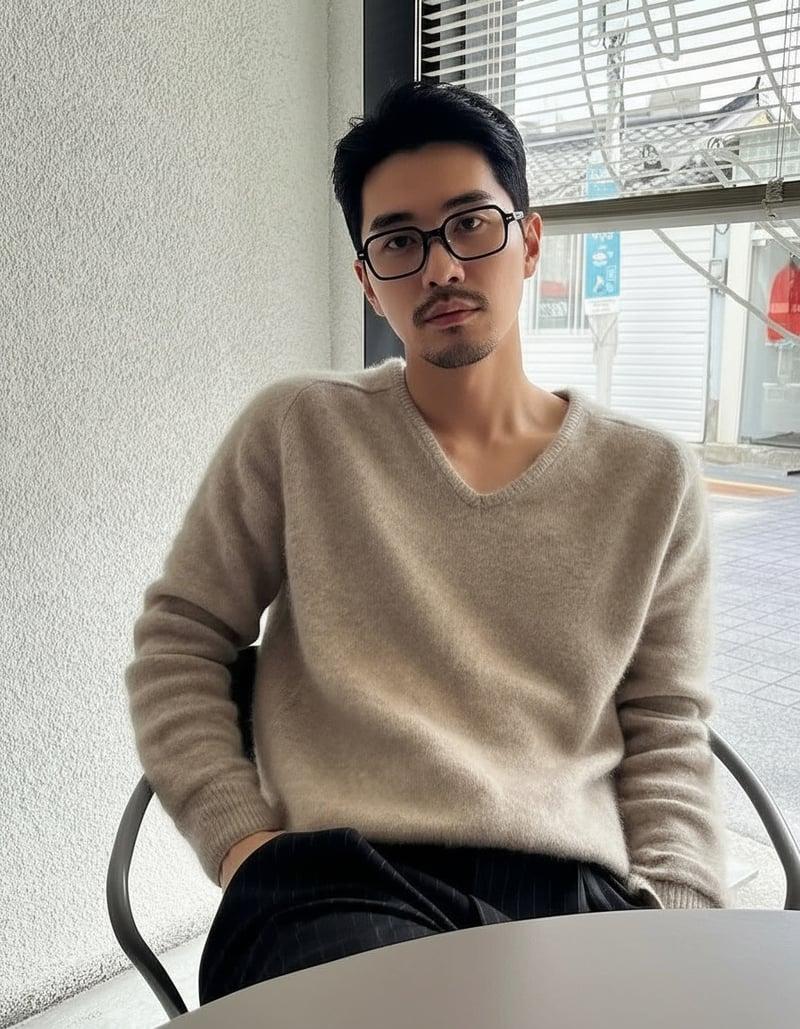
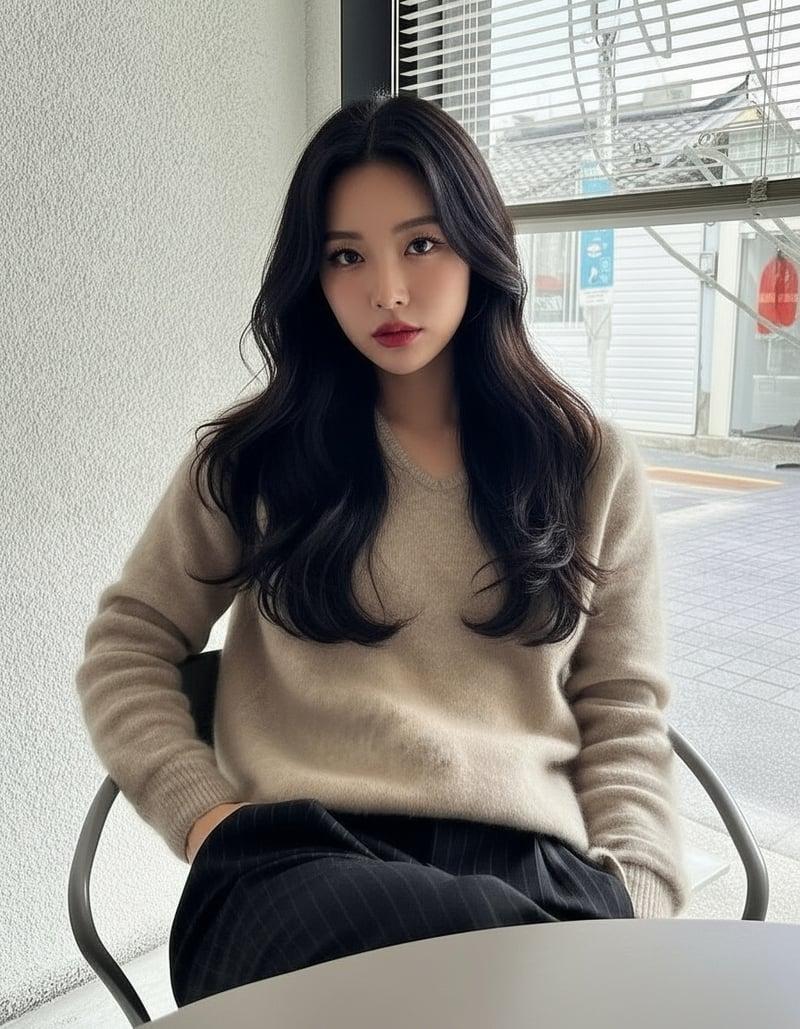
Step one, the gender swap: hair length, brows, glasses and face outline change while the pose and setting stay. These are the details to note for wig and makeup.
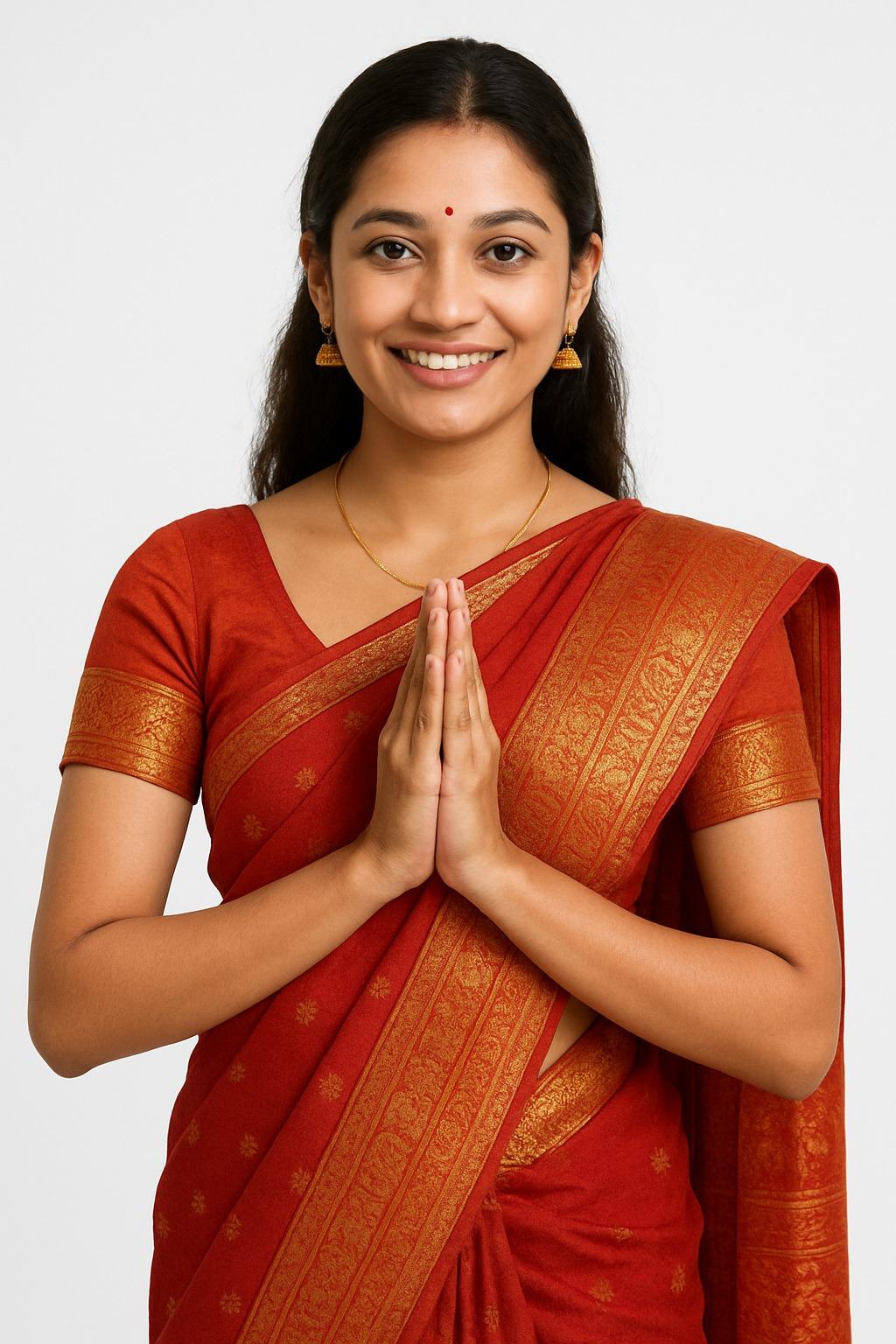
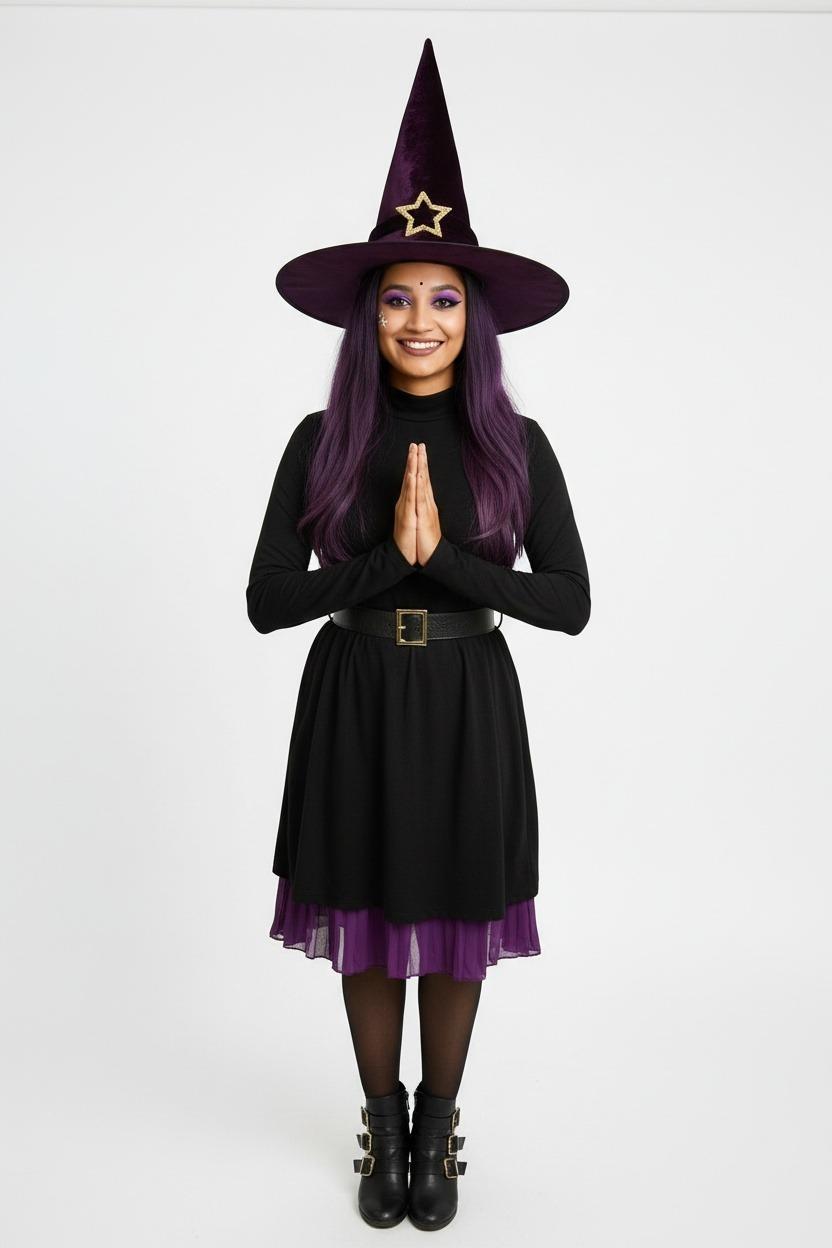
Step two, a costume test in Cosplay mode (Night Witch preset): the face and smile stay, while outfit, hair colour and makeup change and the frame extends to full length. Results vary from photo to photo.
Step-by-step planning workflow
1. Start from a clear, bare-faced photo
Front-facing, camera at eye level, soft even light, hair pulled back from the face, no makeup or only light makeup, no beauty filter. This shows your actual structure, which is what your makeup will be working with on the day. Tips: best photo for AI gender swap.
2. Generate the opposite-gender version
Run a gender swap in the direction of your character. Generate from two or three different photos if you can; comparing versions shows which changes are consistent for your face and which are random.
3. Pull planning notes from the result
Look at the result next to your original and write down what changed:
- Brows: thicker and straighter for a masculine look, higher and more arched for a feminine one. Note where the new brow starts and ends relative to yours.
- Jaw and cheek contour: where the result adds or removes width tells you where to place contour and highlight.
- Hairline and length: a masculine result often has a squarer hairline at the temples; a feminine one frames the face with length. This helps you choose a wig cut and whether you need a lace front.
- Lips and eyes: fuller or thinner lips, lash emphasis and eyeliner weight.
- Facial hair: for female to male, whether stubble or a beard suits your face, and its shape.
Keep the preview on your phone while practising makeup.
4. Test the costume look
In Cosplay mode, pick a preset look and generate with your original or gender-swapped photo. Optional settings let the result match the character's pose and, at a higher credit cost, render in HD (about 1 to 2 minutes). This is a quick way to see whether a colour palette or style suits you before buying fabric or a wig. See how to turn your photo into a cosplay character and AI cosplay ideas.
5. Translate the preview into a shopping and practice list
| From the preview | Decision |
|---|---|
| Hair length and hairline | Wig length, cut, lace front or not |
| Hair colour that suits your skin | Wig colour or dye |
| Brow shape | Brow glue or concealer, brow pencil shade |
| Contour placement | Contour and highlight shades |
| Facial hair | Stubble technique or crepe hair |
| Overall silhouette | Costume fit and layering |
Worked example: planning notes from one preview
Say you plan a female version of a male character. After running a male to female swap of your bare-faced photo, your notes might look like this:
| Feature in the preview | Note for the build |
|---|---|
| Brows lifted and thinned at the tail | Glue down the outer third, redraw higher with a soft arch |
| Jaw narrowed, cheeks fuller | Contour under the jaw corners, highlight the cheek tops |
| Shoulder-length hair framing the face | Wig past the jaw, layered around the cheekbones |
| Softer upper lip line | Slightly overdraw the upper lip centre |
| Lighter lash line | Lower lashes plus a soft wing, nothing heavy |
For a male version of a female character, after a female to male swap:
| Feature in the preview | Note for the build |
|---|---|
| Straighter, thicker brows | Fill brows flatter and closer to the eye |
| Squarer jaw and temples | Contour along the jawline and temples, keep highlight minimal |
| Short hair, squarer hairline | Short wig with a lace front, or style your own hair back |
| Light stubble suits the face | Stipple a stubble shadow with a sponge rather than drawing hair |
| Thinner-looking lips | Matte, skin-tone lip; no gloss |
These are examples of the kind of notes the preview gives you, not rules; your own result decides.
Common mistakes
| Mistake | Result | Better approach |
|---|---|---|
| Planning from a made-up or filtered photo | The preview builds on makeup you will not wear | Start from a bare, unfiltered face |
| Copying the preview's hair exactly | Wig never matches generated hair | Use it to choose length, colour and cut |
| Overdoing every masculine or feminine cue | Face reads as a stereotype, not the character | Pick the two or three changes that matter most |
| Judging from the small preview only | Details are hard to see | Unlock the full-resolution original for close study |
| Skipping a test run | Surprises on the day | Do a full makeup and wig test with photos in the event lighting |
Beyond Halloween
- Conventions: plan a crossplay months ahead and practise the face, not just the costume.
- Photoshoots: show a photographer the look you are aiming for.
- Closet cosplay: see which of your existing clothes and hairstyles already get you close.
- Original characters and fan reinterpretations: explore a genderbent version of a character before committing to a design.
For Halloween specifically, the Halloween costume generator has costume and makeup looks ready to try.
Keep expectations realistic
- The AI preview is a reference, not a makeup tutorial. Real makeup, wigs and lighting will look different.
- A wig never sits exactly like generated hair; use the preview to choose a style, not to judge the exact result.
- Generated faces can soften or exaggerate features. If something looks off, try another photo before changing your plan.
Consent
Use your own photo, or an adult's with their permission. Do not use photos of minors. If you share a preview of a group cosplay, ask everyone in it first.
FAQ
What is genderbend cosplay?
Cosplaying a character as the opposite gender, for example a female version of a male character. Crossplay usually means cosplaying a character of a different gender as written.
Can AI help with genderbend makeup?
Yes, as a planning reference. Comparing your original with the gender-swapped version shows where brows, contour and hairline change, which tells you what to practise.
Can I gender swap and cosplay in one step?
No. Run the gender swap first, then use that result as the input to Cosplay mode. Each is a separate standard generation.
Which looks does Cosplay mode offer?
Ten presets at the time of writing: Sporty Adventurer, Plaid Pop Performer, Cat Street, Neon Cyber, Halloween Vampire, Night Witch, Skeleton Magician, Gothic Jester, Fox Shrine Maiden and Real-Life Full-Body. They are styled archetypes rather than specific copyrighted characters, so use them to test palettes and silhouettes.
Will the preview match my real cosplay?
Not exactly. Real wigs, makeup and lighting differ. Use it to make decisions, then judge the real result in a mirror and test photos.