To see yourself 20 or 30 years older with AI, upload a clear, front-facing portrait to an age transformation tool, choose "older" and the number of years, and compare the result with your original. GenderFlip's Age Transform mode does this in a browser: pick Older or Younger and a step from 5 to 40 years, in 5-year increments, then generate. The result keeps your face, expression and pose while changing skin, hair and facial volume. It is one plausible interpretation, not a prediction of how you will actually age.
Example: 30 years older
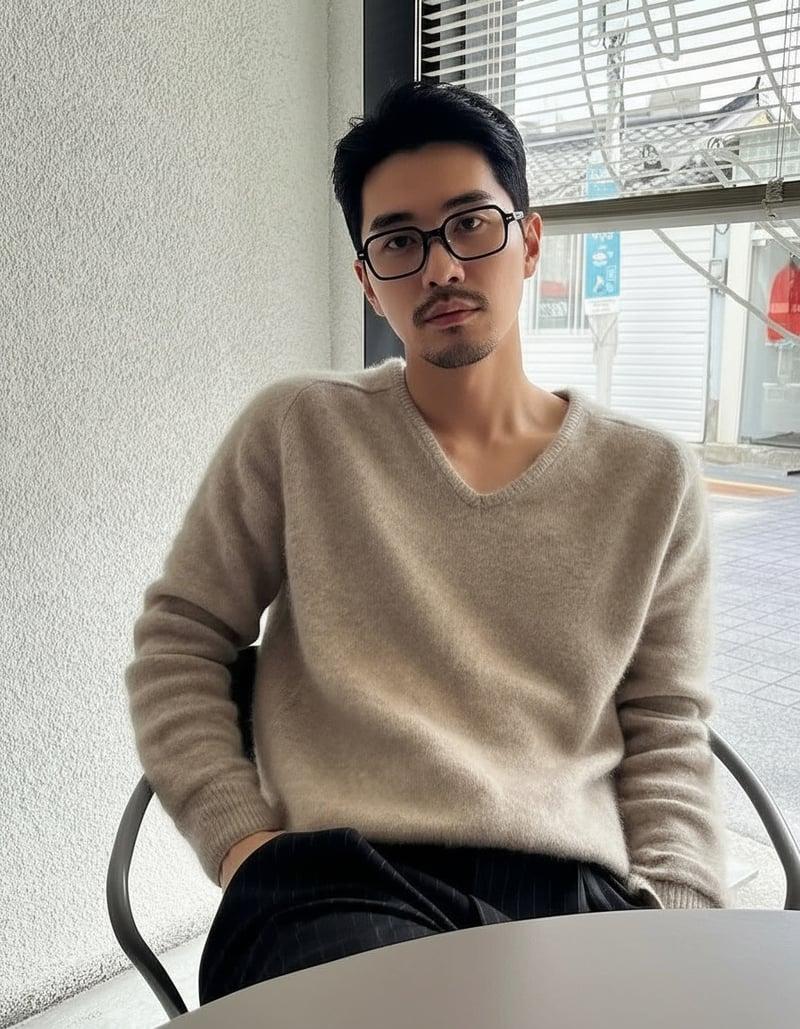
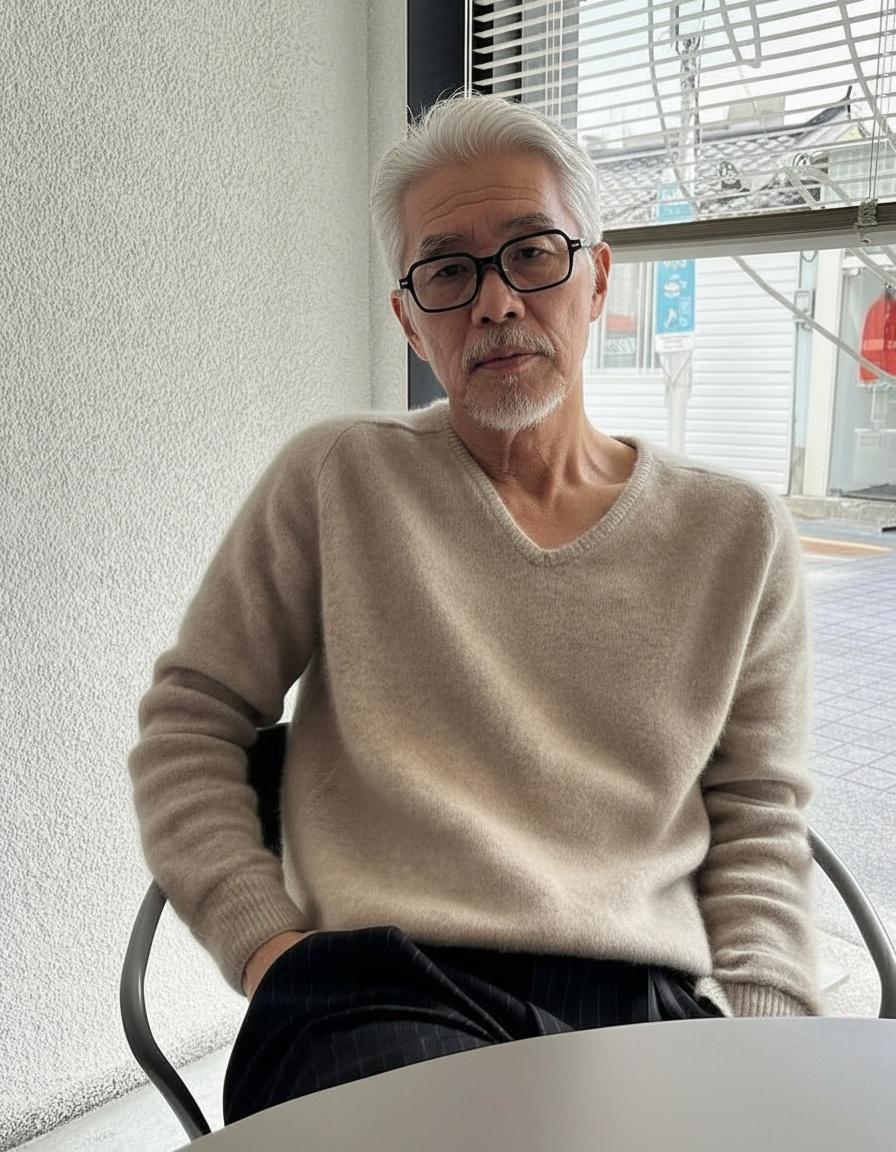
The seated pose, sweater, glasses and window light carry through. Hair turns grey, a grey beard appears, and skin texture and the face's volume change. Results vary from photo to photo.
Step by step
- Choose a clear portrait. Front-facing, camera at eye level, soft even light, one person, no beauty filter. GenderFlip accepts images up to 10 MB.
- Open the generator and select Age Transform in the online generator.
- Pick a direction and amount: Older or Younger, 5 to 40 years. For "20 or 30 years older", start with 20, then try 30 to compare.
- Confirm you have permission to use the photo and generate. A result usually takes 10 to 20 seconds.
- Compare side by side with your original at the same size.
Each standard generation uses 1 credit. Sign up for 1 free standard generation; the free result is a watermarked preview up to 768px on the longest side, and any one-time credit pack unlocks the full-resolution original. Packs start at $1.99 with no subscription.
What changes in an older version
| Feature | Typical change |
|---|---|
| Skin | More texture, fine lines around the eyes and mouth, deeper smile lines |
| Face volume | Less fullness in the cheeks, softer jawline, slight sagging under the chin |
| Eyes | Heavier upper lids, more visible under-eye area |
| Hair and brows | Greying, thinning or a receding hairline; brows may thin or grey |
| Facial hair | May grey, or may be added for older male presentations |
| Neck | More lines and less firmness |
What should stay the same
- Eye shape and colour, the strongest identity cue
- Expression, including a smile if you had one
- Skin tone, with added texture rather than a colour shift
- Nose and overall proportions
- Pose, clothing and background from the original
If the eyes or expression change, the result stops looking like an older you and starts looking like a different older person.
The best photo for age transformation
Aging is mostly about fine detail: skin texture, lines, hair. That makes photo quality even more important than for other effects.
- Sharp and well lit. Blurry or dark photos give the model too little texture to age realistically.
- No beauty filter. Smoothed skin removes the detail aging builds on and can produce waxy results.
- Front-facing or a slight turn. Strong angles hide half the face.
- Neutral face or a natural smile. Big expressions add creases the model may exaggerate.
- Face clearly visible. Sunglasses, hats and hair over the forehead hide areas that change with age.
Full checklist: best photo for AI gender swap and other portrait effects.
Why results look better on some faces
- Lighting and resolution matter most: more visible detail, more believable aging.
- Starting age: making a 25-year-old look 55 is a bigger jump than making a 45-year-old look 60, and big jumps involve more invention.
- Very smooth or filtered skin gives the model less to work with.
- Accessories such as thick glasses or hats can be changed or kept inconsistently.
If a result looks off, change the photo before changing the number of years.
Choosing how many years
| Setting | What to expect | Good for |
|---|---|---|
| 5 to 10 years older | Subtle: a few lines, slightly less volume, early greying | A realistic "near future" look |
| 20 years older | Clear change in skin, hair colour and face volume | The classic "me at 50 or 60" comparison |
| 30 years older | Strong change; hair often grey or white, deeper lines | Milestone birthdays, family resemblance |
| 40 years older | Maximum change; more invention by the model | Curiosity and fun; expect more variation |
Generate 20 and 30 years from the same photo and put them side by side. Seeing the progression is often more convincing than a single jump.
Problems and fixes
| Problem | Likely cause | Fix |
|---|---|---|
| Looks like a different older person | Eyes or expression changed; angled or shadowed photo | Use a front-facing, evenly lit photo |
| Waxy, smooth skin with sudden wrinkles | Beauty filter in the source | Use an unedited photo |
| Grey hair looks painted on | Hat or fringe hiding the hairline | Push hair back, remove hats |
| Too extreme | Very large step for a young face | Try a smaller number of years first |
| Blurry result | Low-resolution or compressed source | Use the original camera file |
Make a side-by-side image
- Download the original and the aged result at full resolution.
- Put them side by side in any photo editor or collage app, at the same height.
- Add small labels such as "now" and "+30" so the comparison is instant.
- For a print, check the pixel dimensions are enough for the print size you want.
Younger works too
Choosing Younger smooths skin, adds fullness to the face and restores hair colour. Very large "younger" steps can drift toward a generic face, so start small. GenderFlip is for adults only; do not upload photos of minors, and do not try to make an adult look like a child.
What it can and cannot tell you
An AI age transformation shows how a model imagines your face older, based on common aging patterns. It cannot account for genetics, health, sun exposure, weight changes or lifestyle, and it is not medical or health information. Treat it as fun, a creative reference, or a conversation starter.
Ways people use it
- Curiosity: "what will I look like at 60?"
- Family fun: compare your older self with a parent or grandparent at the same age, with their permission.
- Gifts and keepsakes: a side-by-side print for a milestone birthday, made with the person's agreement. Check the image size before printing.
- Writers and artists: a consistent reference for a character at different ages. See character references for artists and writers.
Age transform or gender swap?
Age transform keeps your gender presentation and changes how old you look. A gender swap keeps your approximate age and changes presentation. Both run in the same generator, one at a time, so you can try both with the same photo. See how accurate AI transformations are.
FAQ
How do I see myself 30 years older?
Upload a clear front-facing portrait, choose Age Transform, select Older and 30 years, and generate.
What is the maximum age change?
GenderFlip's Age Transform goes from 5 to 40 years older or younger, in 5-year steps.
Is AI age progression accurate?
It produces a plausible older version based on general aging patterns, not a prediction. Real aging depends on genetics, health and lifestyle.
Can I use an old photo?
Yes, if the face is sharp and well lit. Scan prints at high resolution and avoid small, grainy faces.
Can I age a photo of my parent or partner?
Only an adult's photo, and only with their permission. If you plan to share or print the result, ask them about that too.
Does it work with glasses?
Usually. Thin, clean frames tend to carry through; glare or thick tinted lenses can hide the eye area that changes with age.
Can I make myself look younger?
Yes, choose Younger. Start with smaller steps for the most natural result.