A female to male AI transformation redraws a portrait with a more masculine presentation: a stronger jaw and brow, a different hairline and hairstyle, sometimes facial hair, while keeping your eyes, expression, skin tone and the overall shape of your face. A natural result still looks like you, just presented differently. Most unnatural results come from two things: a weak source photo, or an output that overdoes the masculine features until the face stops being yours.
This guide explains what the AI changes, what to check in the result, and how to get a believable version from a single selfie. To try it directly, open the female to male AI tool, which has the direction preselected.
Example
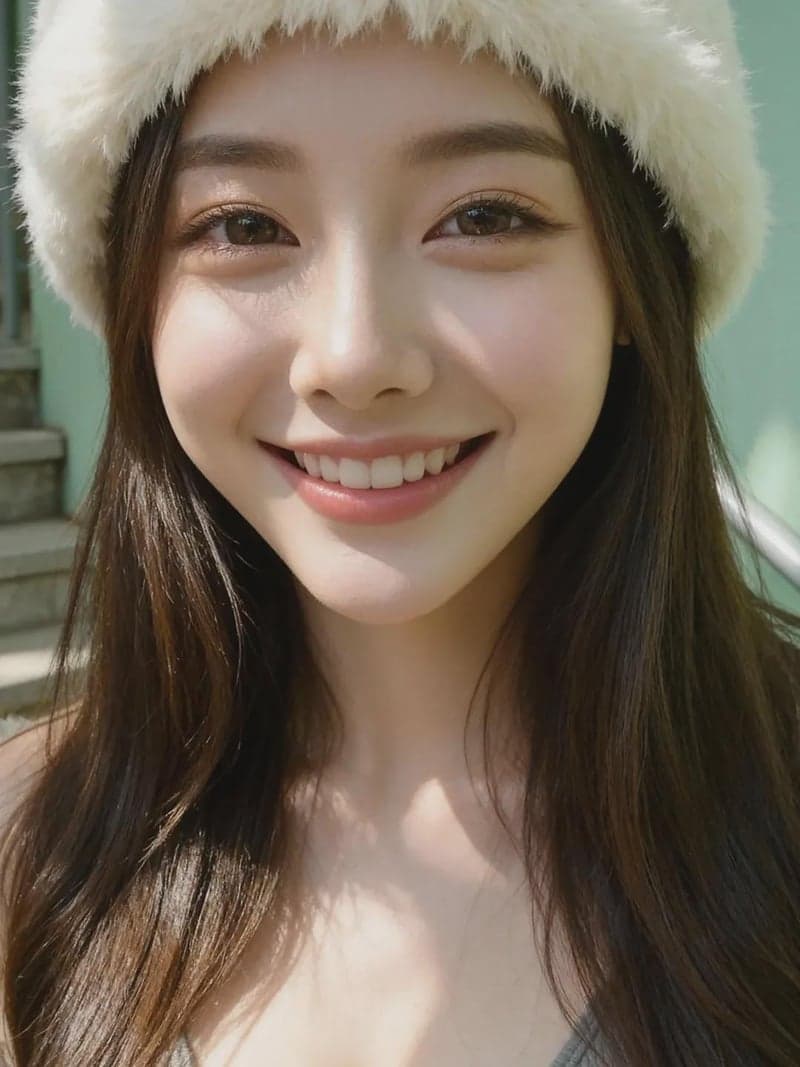
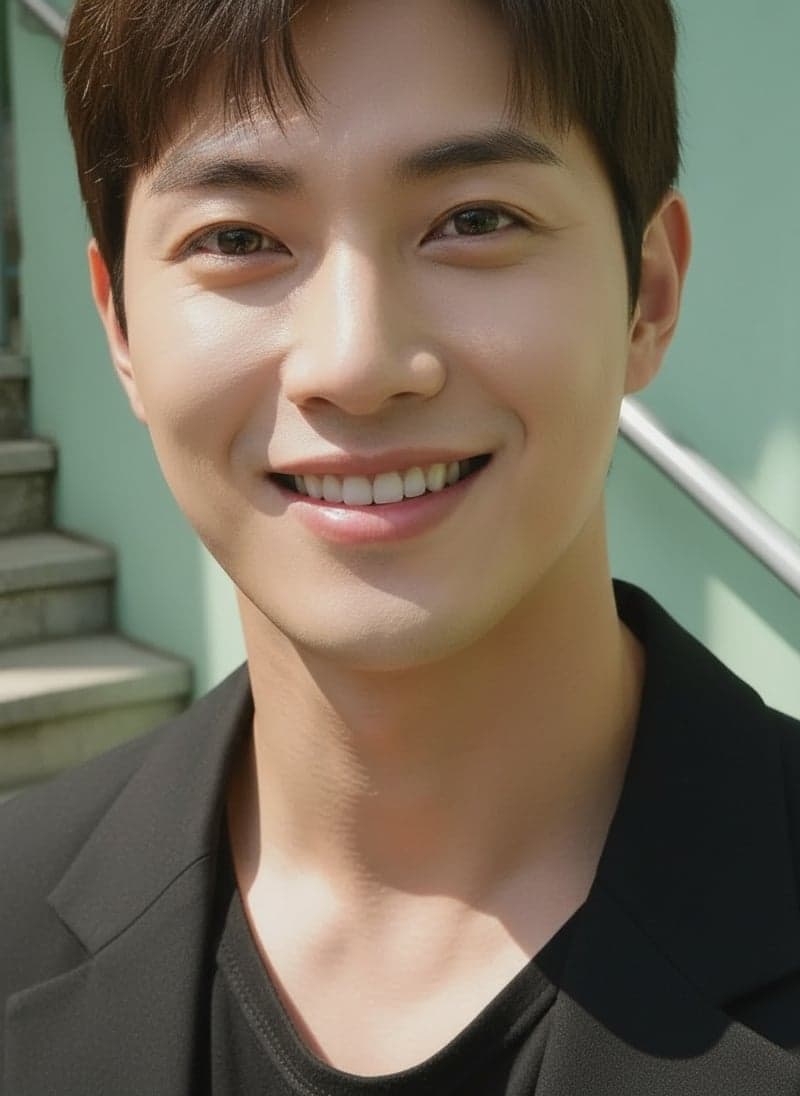
The smile, pose and background carry through. The hat, hairstyle and clothing change, and the jaw and brows read more masculine. Results vary from photo to photo.
What the AI changes
| Feature | Typical change | What looks natural |
|---|---|---|
| Jaw and chin | Wider, squarer lower face, more defined chin | Stronger, but still the shape of your face |
| Brows and brow ridge | Thicker, straighter brows, slightly heavier brow area | Brows that match your hair colour and sit in the same place |
| Cheeks | Less soft fullness under the cheekbones | Subtle change; hollow cheeks look aged, not masculine |
| Hairline and hair | Shorter cut, more angular hairline at the temples | A hairstyle that fits the face and lighting |
| Facial hair | Stubble or a beard may be added | Even density, edges that follow the jaw |
| Skin texture | Slightly coarser texture, less smoothing | Real pores and texture, not a painted surface |
| Neck and clothing | Thicker neck, more masculine styling | Consistent with the original pose and setting |
What should stay the same
A good female to male result keeps:
- Eyes: shape, colour and spacing. This is the strongest identity cue.
- Expression: if you smiled, the result should smile the same way.
- Skin tone and the lighting of the original photo.
- Nose and the overall proportions of the face.
- Pose and setting, unless the tool deliberately restyles them.
If the eyes or expression change a lot, the result will look like a different person no matter how good the jaw looks.
Why female to male can be harder to get right
Masculinizing a face asks the model to add structure that was not in the photo: a heavier jaw, a brow ridge, facial hair. Adding is harder than softening. Two failure modes are common:
- Overdoing it. The model pushes every masculine feature at once and the result looks like a generic man rather than you. "Male" does not mean "exaggerated".
- Painted-on details. Facial hair or a hairline that does not follow the lighting and edges of the face looks stuck on.
Both get worse when the input hides the jaw, brows or hairline.
How to get a natural result from one selfie
- Choose a clear, front-facing photo at eye level, in soft even light. Avoid low-angle selfies; they already exaggerate the chin and make the result heavier than you are.
- Keep the jaw, brows and hairline visible. Pull hair back from the face and temples, remove hats, and avoid a hand or scarf near the chin.
- Skip beauty filters and heavy contouring. Smoothing and contour makeup change the apparent bone structure, and the model will treat the change as real.
- Use a neutral expression or a natural smile. Big expressions stretch the features the model needs to read.
- Use the original, sharp file rather than a screenshot or a compressed copy. GenderFlip accepts images up to 10 MB.
- Compare the result with the original side by side before deciding whether to try another photo.
More input advice, including glasses, makeup and old photos: best photo for AI gender swap.
Check the result feature by feature
Look at the result at full size, next to the original:
- Eyes first. Same shape and spacing? If not, the photo probably had shadows, glasses glare or an angle problem.
- Jawline. Stronger is expected; a jaw that is suddenly much wider than your face shape is not.
- Brows. Should sit where yours do and match your hair colour.
- Hairline. Should look like it grows from the scalp, without a hard edge at the temples.
- Facial hair. Check that the edges follow the jaw and the density is even.
- Skin. Real texture, not plastic smoothing or a grainy overlay.
Common problems and fixes
| Problem | Likely cause | Fix |
|---|---|---|
| Looks like a different man | Eyes or expression changed; weak input | Use a frontal, evenly lit, unfiltered photo |
| Jaw too heavy | Low camera angle | Retake with the camera at eye level |
| Beard looks pasted on | Jaw partly hidden or shadowed | Use a photo with a clear, evenly lit jawline |
| Hairline looks unnatural | Hat, fringe or hair over the temples | Push hair back, remove hats |
| Plastic skin | Beauty filter in the source | Use an unedited photo |
| Result looks generic | Small face in frame, low resolution | Use a head-and-shoulders crop of the original file |
If the face no longer looks like you, see realistic gender swap results that keep your face.
Realistic expectations
A single selfie gives the model one view of your face. It produces one plausible masculine version of that view, not a prediction. It cannot show the effects of hormone therapy or surgery, and it is not a test of anyone's identity. People use it out of curiosity, to explore a presentation, to plan a cosplay or character, or simply for fun; all of these are fine, as long as the photo is yours or you have permission.
Use GenderFlip for female to male
Open the female to male AI page, upload an adult portrait you have permission to use, and generate. It usually takes 10 to 20 seconds.
- Sign up for 1 free standard generation. The free result is a watermarked preview up to 768px on the longest side.
- Any one-time credit pack unlocks the full-resolution original without the watermark. Packs start at $1.99; there is no subscription. See pricing.
- Photos are processed on servers. Uploaded originals in the current private flow expire after 1 hour and unsaved results after 24 hours; see what happens to your photos.
For the opposite direction, see can AI turn a male photo into a female one.
FAQ
Can one selfie create a realistic male version of me?
Yes, if the selfie is clear, front-facing and evenly lit. The result is one interpretation; another photo can give a somewhat different version.
Why does my result not look like me?
Usually because the input hid or distorted the eyes, jaw or hairline: shadows, a low angle, glasses glare, a hat or a beauty filter. Try a clearer photo before changing tools.
Is a no-makeup selfie better?
Natural or light makeup is fine. Heavy contouring and beauty filters make the model misread your bone structure.
Will the AI add a beard?
It can, depending on the photo and the generated style. Check the edges and density; a beard that does not follow the jaw is the most common sign of an unnatural result.
Can I use the result as an avatar or post it?
For your own photo, yes. Use the clean original from a credit pack if you want no watermark, and get permission before editing or sharing anyone else's portrait.