Most gender swap videos on TikTok, Reels and Shorts are made in two parts: first a still AI portrait of the person as the opposite gender, then a short vertical video that reveals it next to the original, usually timed to a beat or a reaction. Some people use a live filter instead, which is faster but looks like a filter. If you want the reveal to land, a realistic still image that clearly looks like you is what makes people stop scrolling.
This guide covers the workflow, the formats that work, and the rules for labelling AI content.
Example: the two frames of a reveal
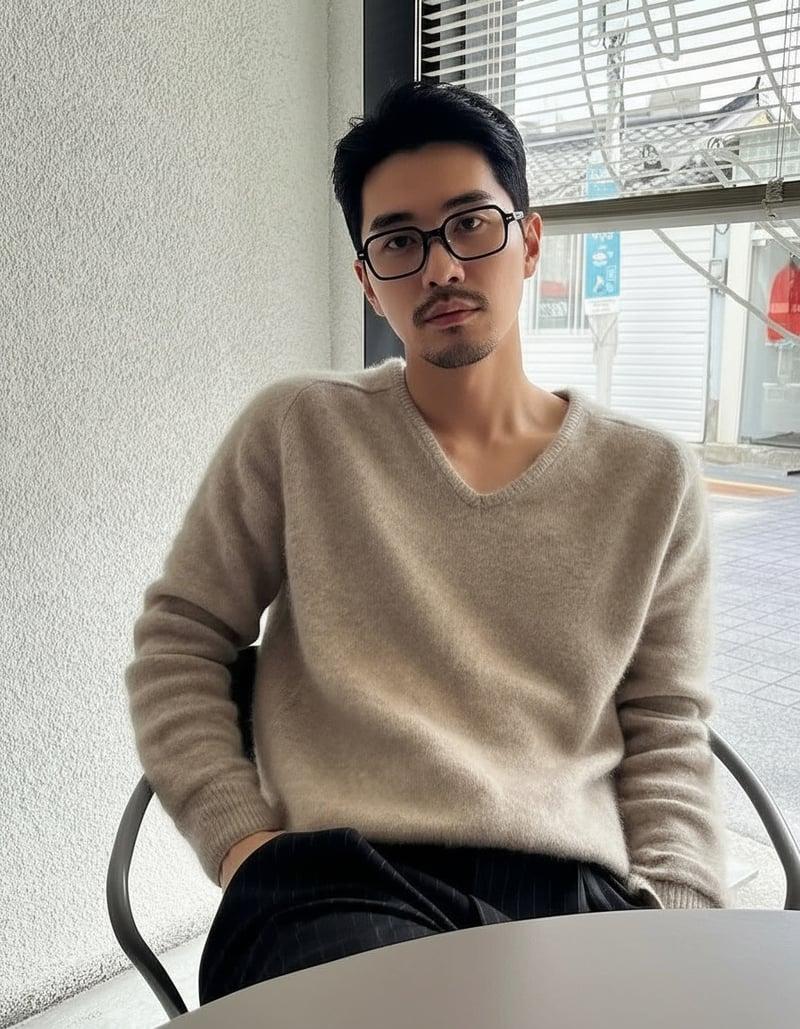
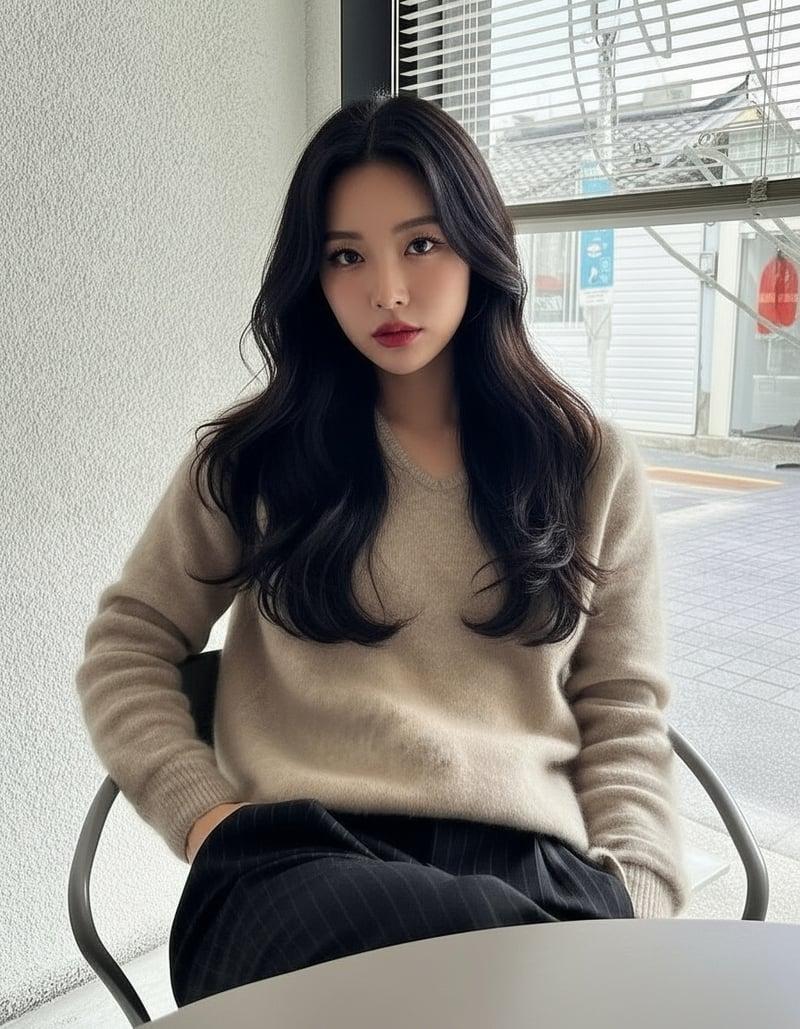
The original and the swap share the same crop and eye height, which is what makes a cut between them read as one person changing. Results vary from photo to photo.
The three-step workflow
1. Make the gender-swapped image
Take or choose a clear, front-facing portrait: soft light, camera at eye level, no beauty filter, one person. Upload it to the online generator, or use male to female or female to male with the direction preselected. A result usually takes 10 to 20 seconds.
Sign up for 1 free standard generation. The free result is a watermarked preview up to 768px on the longest side, fine for checking the look. For video, unlock the full-resolution original with any one-time credit pack (from $1.99, no subscription), so the image stays sharp when the app scales it to full screen.
Photo advice: best photo for AI gender swap.
2. Build the vertical reveal
Use the platform's own editor, CapCut, or any video editor:
- Format: vertical 9:16. Keep faces in the middle of the frame, away from the caption area at the bottom and the buttons on the right.
- Match the framing of the original and the swap: same crop, same size, eyes at the same height. A mismatched crop makes the reveal feel like two different photos.
- Short is better: the before, a beat, the after. Many reveals are only a few seconds long.
- Templates: CapCut and the in-app editors have before-and-after and transition templates; drop in your two images and adjust the timing.
3. Post with context and the AI label
Say what it is in the caption ("AI gender swap of me") and use the platform's AI-generated content label. TikTok, YouTube and Instagram all ask creators to disclose realistic AI-generated or altered content, and offer a toggle or label for it. Clear labelling also stops the comments from becoming an argument about whether it is real.
Formats that work
| Format | How it works | Why it gets shared |
|---|---|---|
| Beat-drop reveal | Original, then swap on the beat | Fast payoff, easy to rewatch |
| Side-by-side | Split screen, original left, swap right | Viewers compare features themselves |
| Reaction | Film your face seeing the result for the first time | Genuine surprise is the content |
| Couple or friends swap | Each person's swap, then reveal who is who | Invites tagging and duets |
| Guess who | Show the swap first, reveal the person at the end | Pushes viewers to watch to the end |
| Family resemblance | Your swap next to a parent or sibling (with permission) | Surprising likeness gets comments |
What makes a gender swap video worth sharing
- It is clearly still you. The fun is recognising the person. A generic face kills the reveal.
- It looks real enough to pause on. Natural skin, believable hair and consistent lighting.
- The setup is instant. Viewers should understand what they are watching in the first second.
- The tone is playful, not deceptive. Label it, keep it light, and do not use it to mock anyone.
- It invites participation. "Try it and stitch me" or "guess the original" gives people a reason to respond.
A simple shot list for a beat-drop reveal
| Moment | On screen | Text overlay idea |
|---|---|---|
| 0 s | You, original photo or live camera, neutral face | "Asked AI to make me a girl/guy" |
| Build-up | Short zoom or slow push-in on the original | "Wait for it" |
| Beat drop | Cut to the gender-swapped image, same crop | none, let the image land |
| Hold | Side-by-side or alternate between the two | "Would you recognise me?" |
| End | Your real reaction, or a prompt to stitch | "Do yours and tag me" |
Keep the swap on screen long enough to look at, roughly a second or two, and loop-friendly: if the last frame cuts cleanly back to the first, people watch it twice.
Common mistakes
| Mistake | Why it hurts | Fix |
|---|---|---|
| Different crops for before and after | Looks like two different photos | Match size, framing and eye height |
| Using the watermarked preview full screen | Small and marked when scaled up | Use the unlocked full-resolution original |
| Face hidden under captions or buttons | The reveal is covered | Keep faces in the centre third of the frame |
| No context in the first second | Viewers scroll before the payoff | Put the setup in text immediately |
| No AI label | Comments argue about whether it is real | Use the platform's AI label and say it in the caption |
| Posting friends without asking | Breaks trust, can get reported | Get permission before posting |
Captions and hashtags
Keep captions short and specific: what it is, and a prompt. "AI gender swap of me. Would you recognise me?" works better than a long explanation. Common tags such as #genderswap, #genderswapchallenge, #aigenderswap and #beforeandafter help people find the trend; add one or two that describe your angle, such as #couplegoals for a couple swap.
Reaction content
Reaction videos work because the surprise is real. Record your screen or camera before you open the result, keep the first reaction, and cut everything else. For group reactions, generate everyone's swap in advance and reveal them one at a time. Only include people who agreed to be filmed and transformed.
Live filters vs a generated image
A live gender Lens is instant and works on video, which suits quick jokes. Because it tracks your moving face and overlays changes, it rarely looks like a real person. A generated portrait takes a few seconds per image, but gives a believable still that holds up full screen. Many creators combine both: a live filter for the setup, the realistic image for the payoff. See the comparison of gender swap apps and filters.
Consent and safety
Only post swaps of yourself or of adults who agreed to it, and get their OK before posting even if they agreed to the edit. Do not use other people's photos to impersonate them, do not make sexualised or humiliating edits, and do not use photos of minors. More on this: privacy and consent before uploading.
More ideas
- Gender swap challenges people actually want to share
- Make a gender swap profile picture
- Creators: thumbnails, avatars and brand variants
FAQ
How do people make the gender swap videos on TikTok?
They create a realistic opposite-gender image of themselves with an AI tool, then put the original and the swap into a short vertical before-and-after edit, often with a template and a beat drop.
What resolution should the image be?
Use the full-resolution original rather than a preview or screenshot, so it stays sharp when scaled to a 9:16 full-screen video.
Do I need to label it as AI?
Yes. TikTok, YouTube and Instagram ask creators to disclose realistic AI-generated content and provide a label for it. A clear caption helps too.
Can I make a video from one photo?
Yes. One original and one swap is enough for a reveal. A few photos with the same framing let you make a longer sequence.
Is a filter or an AI image better?
A filter is faster and works live; an AI image looks more real. For a reveal that people stop on, use the realistic image.